Confirm there is a real person, live — in seconds.
Liveness detection and face biometrics that run straight in the browser or in your app — no hardware, no friction. They stop photos, video, masks and deepfakes, and confirm the face really belongs to the ID on file.
Don't take our word for it. Try it yourself.
Point the camera and run a liveness check right now, here in the browser — the same challenges and the same anti-spoofing your customers will meet. Nothing is installed; nothing leaves your device unencrypted.
- React to the randomized challenges and watch liveness pass in real time.
- Try to fool it with a photo or a video on screen — and watch it get blocked.
- This is exactly the Web SDK you integrate in production.
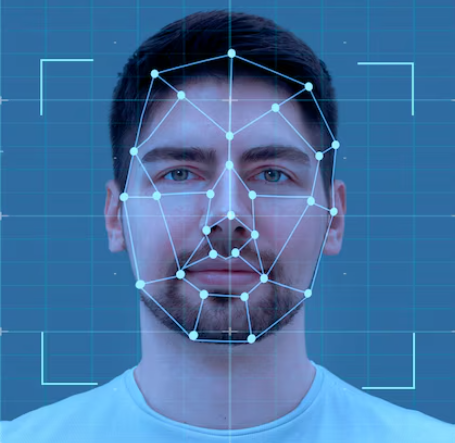
Face detection example. Run the real test →
Identity fraud got cheap. Proving you are a real person did not.
Mule accounts, deepfakes and leaked selfies turned digital onboarding into an easy target. Asking for "a photo" is no longer enough — you have to prove there is a live person, right there, right now.
Photos and video fool the check
A leaked selfie or a recorded video sails through anything that only checks "whether there is a face". Here, no live reaction means no pass.
Deepfakes scale fast
Face swapping and synthetic faces have become commodities for fraudsters. Stopping them takes far more than face recognition.
Identity ≠ a live person
Knowing a face exists says nothing about whether it is present, or whether it belongs to the ID on file. BioTrust settles both.
Liveness detection in 3 simple steps
For the end user it is fast and intuitive. For you, it is a clear answer: pass or fail.
The user looks at the camera
In the browser or in the app, with nothing to download and no special hardware. A guide oval positions the face in seconds.
They react to the challenges
Randomized movements and lights prove there is a live person, right there, right now — not a photo, a video or a deepfake.
You get the answer
Live person? Matches the ID? It comes back ready for your system to decide, with a score and an image, in seconds.
Everything a serious verification needs
Liveness detection, face recognition and fraud prevention in one stack — on the client and enforced again on the server.
Liveness with randomized challenges
The user reacts to challenges drawn on the spot — turn, move closer, blink. A photo, a recorded video or another device's screen simply cannot answer.
Face recognition + official database
It goes beyond 'there is a live face': it confirms that face belongs to the ID holder, matching against the official biometric database. Real identity, not just presence.
Two-layer anti-spoofing
The same fraud-prevention model runs on the device and is checked again on the server — which never blindly trusts the client. Masks, deepfakes and screen replays fail both.
Active illumination against deepfakes
In the browser, the screen fires a random sequence of colored lights and measures the 3D reflection on the face. Injected video and synthetic faces do not reproduce that physics.
End-to-end encryption
The image leaves the device encrypted with AES-256 and only the server decrypts it, using an ephemeral key per session. No biometric data travels or sits exposed in the clear.
SDKs for Web, iOS, Android, .NET MAUI, Flutter and React Native
One biometric database for every platform you ship. Native SDKs and a REST API with documentation that actually helps — the first validation runs the same day.
FaceMatch: enroll once, recognize from then on
Beyond proving liveness, BioTrust identifies who the person is — matching the face against your own enrolled database, on the spot and with liveness detection included.
- Liveness detection included — nobody gets in, or enrolled, with a photo.
- Enrollment and people management from the SDK itself (add, edit, list).
Enrolled database
Where to use FaceMatch
Access control
Open turnstiles, gates and restricted areas by face — no badge, no password.
Front desk & buildings
Recognize residents and authorized visitors right at the entrance, with a record of every passage.
Event check-in
Entry without queues: the face is the ticket, with liveness detection against fraud.
Returning customers
Identify existing customers and tailor the service on the spot.
Deduplication & fraud prevention
Stop the same person from opening several accounts under different identities.
Time & attendance
Attendance you can trust, immune to clocking in for a colleague.
// 1. Enroll a person in the database (capture + liveness)
const manager = sdk.createManager(config, callback);
await manager.addPerson({
  document: "12345678901",
  documentType: "CPF"
});

// 2. From then on, identify with a 1:N search
const busca = {
  uuid: "usuario-123",
  apiUrl: "https://api.biotrust.io",
  validationMode: "FaceMatch",
  faceMatchConfig: { RequireChallenges: true }
};

const launcher = sdk.createLauncher(busca, {
  onValidationComplete: (r) => {
    const m = r.faceMatchResult;
    if (m?.match) liberarAcesso(m.fullName, m.similarity);
  }
});
await launcher.launch();Challenges only a present person can complete
Instead of waiting for the user to "hold still and look at the camera", BioTrust asks for reactions drawn at random in every session. The order changes every time — so recording a video beforehand gets you nowhere: it will never answer in the right sequence.
- Random sequence per session — the answer cannot be pre-recorded.
- Fast and guided — the user finishes in seconds, with no friction.
- Runs on the device — no heavy video sent to the server.
Randomized challenges
The barrier that stops injected deepfakes
During validation, the screen fires a random sequence of colored lights and measures how the face reflects each color in 3D. A real person reflects the right physics; an injected video or a synthetic face does not.
- Color correlation — the reflection has to match the light that was drawn.
- 3D structure — a flat surface (screen or photo) does not fool it.
- Built into the Web SDK — no extra hardware cost.
A randomized color sequence, measured in real time in the reflection on the face.
Whatever runs on the device, the server checks again
Anti-spoofing runs on the device — fast, and without uploading video. But the server never trusts the client's result: it re-runs the same model over the frame it received before approving. Fraud has to break through both.
- The client score is telemetry only — the decision is made on the server.
- Payload encrypted and bound to the session — no replay.
What BioTrust does not let through
The most common identity fraud attempts — blocked by independent layers of defense, on the device and on the server.
Built for teams that cannot get security wrong
Independent layers of defense, strong encryption and privacy by design — from the device to the server.
Privacy by design
The heavy processing happens on the device and biometrics only travel encrypted. Less data exposed, and you stay in control.
End-to-end encryption
AES-256 with an ephemeral key per session: if a packet leaks, by the next day it is worth nothing.
Anti-deepfake and anti-injection
Active illumination and 3D structure analysis defeat injected video and synthetic faces that fool ordinary systems.
Double-checked on the server
The client score is telemetry only: the server decides, re-running fraud prevention over the frame it received.
Official biometric database
The match is against the official database. The answer is not 'there is a live face' — it is 'this is that person'.
Device binding and anti-replay
Every session is unique and bound to the device, with a single-use nonce. A captured request cannot be sent again.
Built on the standards the market demands
BioTrust security and privacy follow the biometrics and data protection standards. Formal third-party certifications are on our roadmap — and the product was designed to pass them.
Privacy by design
On-device processing, data minimization and biometrics always encrypted — you remain the data controller.
Strong encryption
End-to-end AES-256, with an ephemeral key per session. No biometric data travels in the clear.
Tested against presentation attacks
Anti-spoofing evaluated with the ISO/IEC 30107-3 methodology: photo, video, mask and injection.
Where BioTrust fits
Whenever you need to be certain who is on the other side of the screen.
Banks & Fintechs
Open fully digital accounts without opening the door to fraud. KYC and onboarding that stand up to compliance review.
Government & Services
Release benefits and public services only to the people they belong to, verified against the official database.
Healthcare & Telemedicine
Make sure the right patient is in the appointment and in the medical record — with no red tape for the user.
HR & Signatures
Hire and sign remotely with biometrics that hold legal weight. Remote onboarding, with no paper and no fraud.
Marketplaces & Gig
Verify drivers, couriers and sellers before granting access — and keep the platform clean.
Fraud Prevention & Payments
Re-authenticate risky operations in seconds and cut chargebacks, mule accounts and account takeover.
Why this is not "just another face recognition"
The difference between checking that a face exists and proving there is a real, present, legitimate person.
| Feature | BioTrust | Common approach |
|---|---|---|
| Liveness detection with randomized challenges | passive or absent | |
| Anti-spoofing on the device e on the server | one side only | |
| Active illumination against deepfakes | ||
| Match against the official biometric database | rarely | |
| Runs in the browser, with no app to install | usually requires an app | |
| Processes on the client (low cost and latency) | everything on the server | |
| SDKs for Web, iOS, Android, .NET MAUI, Flutter and React Native | partial coverage |
Integrate in hours, not weeks
One configuration, one call, one ready-made result. Every SDK follows the same logic — what you learn on the web applies on iOS, Android, .NET MAUI, Flutter and React Native.
// 1. Initialize the SDK
const sdk = new BioTrustSDK();
await sdk.initialize();

// 2. Set up the validation
const config = {
  uuid: "user-id",
  apiUrl: "https://api.biotrust.io",
  validationMode: "Liveness"
};

// 3. Launch it and handle the result
const launcher = sdk.createLauncher(config, {
  onValidationComplete: (r) => {
    if (r.success) approve(r.livenessConfidence);
  }
});
await launcher.launch();import BioTrust
// Configure (builder pattern) and launch
let config = try FaceBiometricConfig.Builder()
.setUuid("user-id")
.setApiUrl("https://api.biotrust.io")
.setValidationMode(.livenessOnly)
.setLocale("pt-BR")
.build()
let launcher = BiometricValidationLauncher(
viewController: self,
callback: MyCallback(),
config: config
)
launcher.launch(from: self)import io.biotrust.sdk.*;
// Configure (builder pattern) and launch
FaceBiometricConfig config = new FaceBiometricConfig.Builder()
.setUuid("user-id")
.setApiUrl("https://api.biotrust.io")
.setValidationMode(ValidationMode.LIVENESS_ONLY)
.setLocale("pt-BR")
.build();
BiometricValidationLauncher launcher =
new BiometricValidationLauncher(this, new MyCallback(), config);
launcher.launch(this);const sdk = new BioTrustSDK();
await sdk.initialize();
// Liveness + validation against the ID
const config = {
uuid: "user-id",
apiUrl: "https://api.biotrust.io",
validationMode: "LivenessWithDocument",
documentInfo: {
document: "12345678901", // ID number
birthDate: "1990-01-01T00:00:00.000Z" // date of birth
}
};
const launcher = sdk.createLauncher(config, {
onValidationComplete: (r) => {
if (r.success) approve(r.documentResult);
}
});
await launcher.launch();import BioTrust
// Liveness + validation against the ID
let doc = DocumentInfo(cpf: "12345678901", birthDate: birthDate)
let config = try FaceBiometricConfig.Builder()
.setUuid("user-id")
.setApiUrl("https://api.biotrust.io")
.setValidationMode(.livenessWithDocument)
.setDocumentInfo(doc)
.build()
let launcher = BiometricValidationLauncher(
viewController: self,
callback: MyCallback(),
config: config
)
launcher.launch(from: self)import io.biotrust.sdk.*;
// Liveness + validation against the ID
DocumentInfo doc = new DocumentInfo("12345678901", birthDate);
FaceBiometricConfig config = new FaceBiometricConfig.Builder()
.setUuid("user-id")
.setApiUrl("https://api.biotrust.io")
.setValidationMode(ValidationMode.LIVENESS_WITH_DOCUMENT)
.setDocumentInfo(doc)
.build();
BiometricValidationLauncher launcher =
new BiometricValidationLauncher(this, new MyCallback(), config);
launcher.launch(this);// 1. Enroll a person in the database (capture + liveness)
const manager = sdk.createManager(config, callback);
await manager.addPerson({ document: "12345678901", documentType: "CPF" });
// 2. From then on, identify with a 1:N search
const busca = {
uuid: "usuario-123",
apiUrl: "https://api.biotrust.io",
validationMode: "FaceMatch",
faceMatchConfig: { RequireChallenges: true }
};
const launcher = sdk.createLauncher(busca, {
onValidationComplete: (r) => {
const m = r.faceMatchResult;
if (m?.match) liberarAcesso(m.fullName, m.similarity);
}
});
await launcher.launch();import BioTrust
// 1. Enrolling people: through the FaceMatch management API (see the docs)
// 2. Identify with a 1:N search in the database
let config = try FaceBiometricConfig.Builder()
.setUuid("user-id")
.setApiUrl("https://api.biotrust.io")
.setValidationMode(.faceMatch(requireChallenges: false))
.build()
let launcher = BiometricValidationLauncher(
viewController: self,
callback: MyCallback(),
config: config
)
launcher.launch(from: self)import io.biotrust.sdk.*;
import io.biotrust.sdk.model.*;
// 1. Enroll a person in the database (capture + liveness)
FaceMatchManagerConfig mgr = new FaceMatchManagerConfig.Builder()
.setUuid("user-id")
.setApiUrl("https://api.biotrust.io")
.build();
new FaceMatchManagerLauncher(this, managerCallback, mgr)
.addPerson(this, "12345678901", "Maria S.", DocumentType.CPF);
// 2. From then on, identify with a 1:N search
FaceBiometricConfig config = new FaceBiometricConfig.Builder()
.setUuid("user-id")
.setApiUrl("https://api.biotrust.io")
.setValidationMode(ValidationMode.FACE_MATCH)
.build();
new BiometricValidationLauncher(this, new MyCallback(), config).launch(this);// 1. Set up the validation
var config = new ValidationConfig
{
Uuid = "user-id",
ApiUrl = "https://api.biotrust.io",
Mode = ValidationMode.LivenessOnly
};
// 2. Present the screen and handle the result
var r = await new BioTrustValidator().ValidateAsync(config);
if (r.IsSuccess) Approve(r.VivacityConfidence);var config = new ValidationConfig
{
Uuid = "user-id",
ApiUrl = "https://api.biotrust.io",
Mode = ValidationMode.LivenessWithDocument,
DocumentCpf = "12345678901",
DocumentBirthDate = new DateTime(1990, 5, 20)
};
var r = await new BioTrustValidator().ValidateAsync(config);
// Identity confirmed in the official database
if (r.IsSuccess) AbrirConta(r.DocumentSimilarity);// 1. Enroll a person in the database (capture + liveness)
var cadastro = new ValidationConfig { Uuid = "user-id", ApiUrl = "https://api.biotrust.io" };
await new BioTrustFaceMatchManager(cadastro)
.AddPersonAsync("Maria S.", "12345678901", DocumentType.Cpf);
// 2. From then on, identify with a 1:N search
var busca = new ValidationConfig
{
Uuid = "user-id",
ApiUrl = "https://api.biotrust.io",
Mode = ValidationMode.FaceMatch
};
var r = await new BioTrustValidator().ValidateAsync(busca);
if (r.Match == true) Liberar(r.PersonName, r.MatchConfidence);// 1. Set up the validation
final config = ValidationConfig(
uuid: 'user-id',
apiUrl: 'https://api.biotrust.io',
mode: ValidationMode.livenessOnly,
);
// 2. Present the screen and handle the result
final r = await const BioTrustValidator().validate(config);
if (r.isSuccess) approve(r.vivacityConfidence);final config = ValidationConfig(
uuid: 'user-id',
apiUrl: 'https://api.biotrust.io',
mode: ValidationMode.livenessWithDocument,
documentCpf: '12345678901',
documentBirthDate: DateTime(1990, 5, 20),
);
final r = await const BioTrustValidator().validate(config);
// Identity confirmed in the official database
if (r.isSuccess) abrirConta(r.documentSimilarity);// 1. Enroll a person in the database (capture + liveness)
final cadastro = ValidationConfig(uuid: 'user-id', apiUrl: 'https://api.biotrust.io');
await BioTrustFaceMatchManager(cadastro)
.addPerson('Maria S.', '12345678901', DocumentType.cpf);
// 2. From then on, identify with a 1:N search
final r = await const BioTrustValidator().validate(ValidationConfig(
uuid: 'user-id',
apiUrl: 'https://api.biotrust.io',
mode: ValidationMode.faceMatch,
));
if (r.match == true) liberar(r.personName, r.matchConfidence);import { BioTrustValidator, ValidationMode } from '@biotrust-io/react-native';
// 1. Set up the validation
const config = {
uuid: 'user-id',
apiUrl: 'https://api.biotrust.io',
mode: ValidationMode.LivenessOnly,
};
// 2. Present the screen and handle the result
const r = await new BioTrustValidator().validate(config);
if (r.isSuccess) approve(r.vivacityConfidence);const r = await new BioTrustValidator().validate({
uuid: 'user-id',
apiUrl: 'https://api.biotrust.io',
mode: ValidationMode.LivenessWithDocument,
documentCpf: '12345678901',
documentBirthDate: new Date(1990, 4, 20),
});
// Identity confirmed in the official database
if (r.isSuccess) abrirConta(r.documentSimilarity);// 1. Enroll a person in the database (capture + liveness)
const cadastro = { uuid: 'user-id', apiUrl: 'https://api.biotrust.io' };
await new BioTrustFaceMatchManager(cadastro)
.addPerson('Maria S.', '12345678901', DocumentType.Cpf);
// 2. From then on, identify with a 1:N search
const r = await new BioTrustValidator().validate({
...cadastro,
mode: ValidationMode.FaceMatch,
});
if (r.match === true) liberar(r.personName, r.matchConfidence);Get your key
Create the account, generate the API key and pick a plan — the test drive releases validations right away.
Add the SDK
A script tag on the web, the native package on iOS and Android, or the NuGet package on .NET MAUI. Set colors, language and challenges in minutes.
Handle the result
Receive liveness, the ID match, the score and the image — and let your backend decide the flow.
Simple, transparent plans
Start on the free plan and move up when your volume calls for it.
50% off for the first 6 months
To evaluate the SDK in a real scenario, with no commitment.
- Liveness detection
- FaceMatch with up to 100 people
- 10,000 validations per month
- SDKs for Web, iOS, Android, .NET MAUI, Flutter and React Native
- End-to-end encryption
For production operations with a mid-sized enrolled database.
R$ 4,990/month
for the first 6 months · then R$ 4,990/month
- Liveness detection
- FaceMatch with up to 500 people
- 50,000 validations per month
- SDKs for Web, iOS, Android, .NET MAUI, Flutter and React Native
- End-to-end encryption
Biometrics against the official database: + R$ 2.00 per query
SubscribeFor high volume, with a service level commitment.
R$ 19,900/month
for the first 6 months · then R$ 19,900/month
- Liveness detection
- FaceMatch with up to 2,000 people
- 250,000 validations per month
- SLA defined by contract
- Priority support
Biometrics against the official database: + R$ 2.00 per query
SubscribeFor tailored volume, environment and compliance requirements.
- Volume and database sized by contract
- Dedicated SLA and environment
- Dedicated support
- Onboarding with a specialist
- Account and device management
Biometrics against the official database: + R$ 2.00 per query
Get in touchQueries against the official document database are charged per use, on top of the monthly fee. Need a different volume? Talk to us.
The questions everyone asks
Do I need any special hardware?
Can a photo or video of the user fool the system?
What about deepfakes?
Is it compliant with data protection law?
How long does integration take?
How does validation against the ID work?
Does it work in low light?
Is biometric data stored?
Can the look and feel be customized?
How do I start testing?
Ready to block fraud without blocking your customers?
Talk to an expert and see BioTrust running in your own flow — web, iOS and Android.